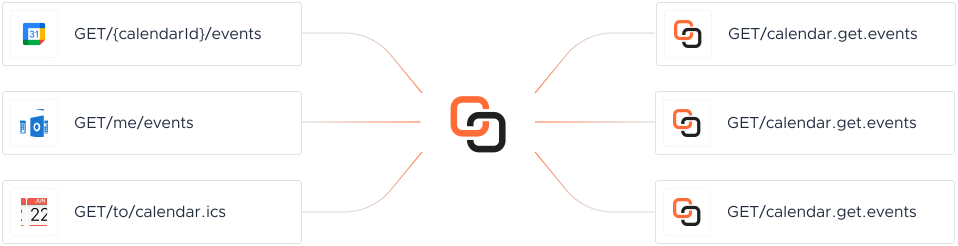
Each Calendar platform exposes its own API, auth, and schema. A Knit MCP Server wraps that platform's real actions as AI-ready tools your agent can call directly — actions like Create Calendar API, Create Calendar Event, Delete a Calendar work the same way no matter which platform your agent is connected to, while Knit manages hosting, auth, and tool exposure underneath.
The Create Calendar API allows you to create a new calendar associated with a user. It supports apps like Outlook Calendar and Google Calendar. The request requires a JSON body with a 'name' field, and optionally 'description', 'timeZone', 'location', and 'metaData'. The response returns a success status and the unique calendar ID if successful, or an error message if not.
Create Calendar Event
The Create Calendar Event API allows users to add a new event to a specified calendar. It supports features such as recurrence, virtual conferencing, and attendee details. The request requires headers for content type and accept, and a body containing details like calendarId, title, start and end times, and attendees. The response includes a success status and the eventId of the created event. In case of an error, a descriptive message is provided.
Delete a Calendar
This API endpoint allows the removal of a calendar using its calendarId, except for the user's primary calendar, which cannot be deleted. It supports apps like Outlook Calendar and Google Calendar. The request must include the calendarId in the body, and the headers must specify 'accept' and 'content-type' as 'application/json'. A successful response returns a success status with null data, while an error response includes a descriptive error message.
Delete Calendar Event API
The Delete Calendar Event API allows you to remove an existing event from a specified calendar by providing the event ID and calendar ID. It supports apps like Outlook Calendar and Google Calendar. The request requires 'eventId' and 'calendarId' in the body, and the headers must include 'accept' and 'content-type' as 'application/json'. A successful response returns a success status with null data, while an error response includes a descriptive error message.
Get Calendar Event Details
The Get Calendar Event API allows you to retrieve detailed information about a specific event from a calendar by providing the calendarId and eventId. It supports apps like Outlook Calendar and Google Calendar. The API requires 'calendarId' and 'eventId' as query parameters. The response includes detailed event information such as title, description, location, start and end times, attendees, organizer, reminders, status, visibility, and conference details.
Get Single Calendar Details
The Get Single Calendar API retrieves details of a specific calendar using the calendarId. It returns information such as the calendar's name, description, timezone, owner details, colors, primary status, visibility, read-only status, reminders, active status, last modified date, location, shared users, and calendar type. The calendarId is a required query parameter obtained from the List Calendars API. The response includes a success flag and the calendar data if successful, or an error message if not.
List Calendar Events
The List Calendar Events API retrieves events from a specified calendar within a given time range, supporting date filtering and pagination. It requires the 'calendarId' as a mandatory query parameter and optionally accepts 'startDateTime', 'endDateTime', 'pageSize', and 'pageToken' for filtering and pagination. The response includes a list of events with details such as title, description, location, start and end times, attendees, organizer, reminders, and conference details.
List Calendars API
The List Calendars API retrieves all calendars associated with a user, including those they own and those shared with them. It supports apps like Outlook Calendar and Google Calendar. The API requires a 'pageSize' query parameter to control the size of results and an optional 'pageToken' to fetch additional records. The response includes details of each calendar such as id, name, description, timezone, owner information, colors, visibility, reminders, and more.
List Event Instances
The List Event Instances API allows you to retrieve a list of all events associated with a master event. This is useful for getting details on recurring events and their individual occurrences within a specified time range. The API requires 'calendarId' and 'eventId' as mandatory query parameters. Optional parameters include 'startDateTime', 'endDateTime', 'pageSize', and 'pageToken'. The response includes details of each event such as title, description, location, start and end times, recurrence patterns, attendees, organizer, reminders, status, visibility, and conference details.
Move Event Between Calendars
This API allows moving an event from one calendar to another. It requires the event ID, the source calendar ID, and the destination calendar ID as mandatory fields in the request body. The API supports Google Calendar. On success, it returns a success status with no additional data. In case of an error, it returns a descriptive error message.
Respond to Calendar Event Invitation
This API allows an attendee to respond to a calendar event invitation by sending their response status for a specific event. The request requires the calendarId, eventId, attendeeEmail, and responseStatus as inputs. The responseStatus can be 'ACCEPTED', 'REJECTED', or 'TENATIVE'. The API returns a success status and any additional data if the operation is successful, or an error message if it fails.
Retrieve Available Common Time Slots for Multiple Attendees
This API is used to retrieve available common time slots for multiple attendees within a specified time range. The request requires the start and end times in ISO 8601 UTC format, a list of attendee email addresses, and optionally the slot duration in minutes. The response includes a list of free time slots available for all attendees. Supported applications include Outlook Calendar and Google Calendar, with a restriction that the gap between start and end should be less than 62 days.
Retrieve Free and Busy Time Slots for Attendees
This API retrieves free and busy time slots for specified attendees within a given time range. It requires the start and end times in ISO 8601 UTC format and a list of attendee email addresses. The response includes the free and busy slots for each attendee, with potential errors if slots cannot be retrieved. The API supports Outlook and Google Calendar, with a maximum time range of 62 days.
Update Calendar Details
The Update Calendar Details API allows users to modify an existing calendar by providing the calendarId. It supports updating properties such as name, description, time zone, location, background color, foreground color, and additional metadata. The request requires a JSON body with the calendarId as a mandatory field, while other fields are optional. The response indicates success or failure of the operation, with an error message provided in case of failure.
Update Calendar Event
The Update Calendar Event API allows users to update an existing calendar event by providing the calendarId and eventId. Users can update details such as the event title, description, start and end times, attendees, and conferencing details. The API supports both all-day and recurring events. The response indicates whether the update was successful or provides an error message if it failed.
Knit shipped a brand-new Timesheet API in a week and handed us a ready-to-use NetSuite sandbox. That velocity is priceless when you're running payroll in 40+ countries.
R
Rohit Singh
GM, Payoneer Workforce Management
#1 in Ease of Integrations
4.9 out of 5 stars on G2
FAQ
Common questions about Calendar MCP Servers
Which Calendar platforms have a MCP Server?
0 Calendar platforms today. Missing one you need? Knit's AI-assisted connector-build process typically adds a new one within days.
Do Calendar mcp servers support both reading and writing data?
Yes. Every action can both read and write, so your agent can pull Calendar data and push updates back to the source app, not just query it.
How does authentication work across Calendar platforms?
Knit manages OAuth, credential storage, and refresh for every Calendar platform — your team never wrestles with tokens, and there's nothing to configure per platform.
What is the timeline for adding a missing Calendar platform?
Typically days, not months — the same AI-based connector-build tooling that lets us maintain the 0 Calendar mcp servers already live.
Do you store Calendar data or customer PII?
No. Knit acts as a stateless passthrough — data is processed on our application server and returned directly to your agent, without being stored on Knit's servers.
What is the pricing model, and is there a free trial?
You choose the model that fits your business — pricing based on integrated accounts, or based on API call volume. Every plan includes a 30-day free trial before billing starts.
The Outlook Calendar API runs on Microsoft Graph. Covers Azure AD auth, OAuth token flow, key endpoints for events and calendars, and integration patterns for production.
In this whitepaper, we discuss all about SaaS integrations: types, trends, forecast and examples. Read on to explore and understand the SaaS integration market
Put Integrations on Autopilot. Talk to Experts.
Knit is loved by customers across the globe due to our seamless product and white glove support. You'll love us too!